
LeadPop Lite
LeadPop Lite helps WordPress website owners collect first names, emails, and phone numbers through a clean, customizable popup.
Build your popup, control where it appears, send subscribers a custom HTML email, deliver new leads to your team, and export subscribers as CSV.
No bloated funnel builder.
No complicated setup.
Just a practical lead capture plugin built for real websites.
Turn Website Visitors Into Leads
Most website visitors leave without taking action.
LeadPop Lite gives you a simple way to capture their contact details before they disappear. Use it for discounts, bookings, newsletters, quote requests, product alerts, lead magnets, and follow-up campaigns.
Install it, customize your popup, choose where it appears, and start collecting leads directly inside WordPress.
What LeadPop Lite Can Do
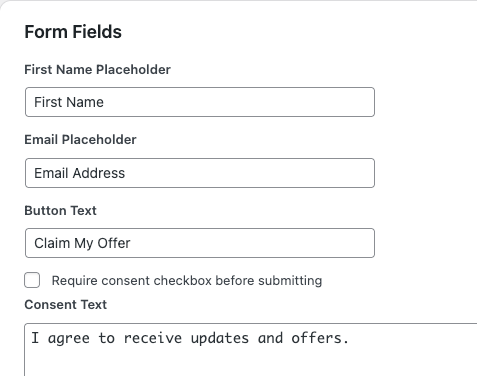
CAPTURE THE DETAILS YOU NEED
Collect:
- Email address
- First name
- Phone number
You can choose whether the first name and phone fields are required, optional, or disabled.
Email stays required because it is the core of the lead capture system.
CHOOSE HOW POPUP APPEARS
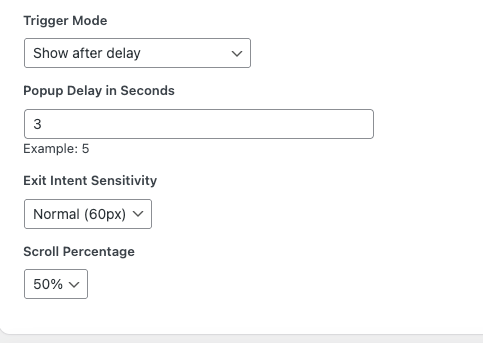
LeadPop Lite includes flexible popup triggers.
You can show the popup:
- After a delay
- On desktop exit intent
- After delay or exit intent
- After scroll percentage
- Only when triggered manually
You can also trigger the popup with a shortcode button.
Example:
[leadpop_button text=”Claim Offer”]
CONTROL WHERE POP UP SHOWS
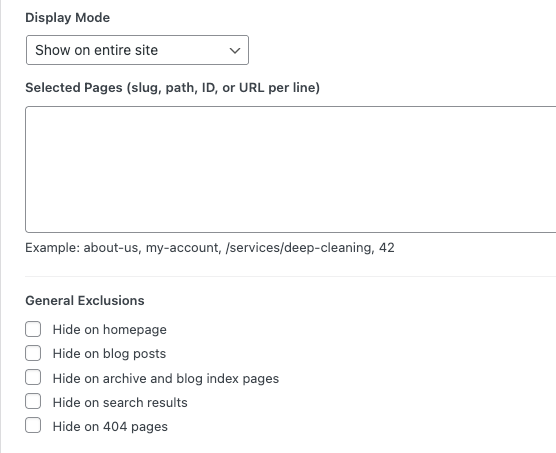
Choose exactly where your popup should appear.
You can:
- Show it across the entire site
- Show it only on selected pages
- Hide it on selected pages
- Hide it on homepage
- Hide it on blog posts
- Hide it on archive pages
- Hide it on search pages
- Hide it on 404 pages
For WooCommerce sites, you can hide it on:
- Shop page
- Product pages
- Cart page
- Checkout page
- My Account page
SEND CUSTOM EMAILS
LeadPop Lite includes a subscriber email system.
Send a welcome email, discount code, booking link, or confirmation message after someone signs up.
The email editor supports:
- Visual editing
- HTML code editing
- Images
- Links
- Buttons
- Inline styling
- Placeholder tags
Supported placeholders include:
{first_name}
{email}
{phone}
{site_name}
{site_url}
{source_page}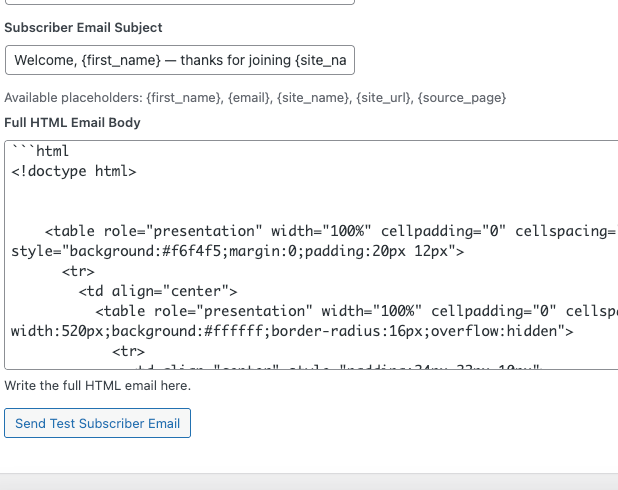
DELIVER LEADS TO YOUR TEAM
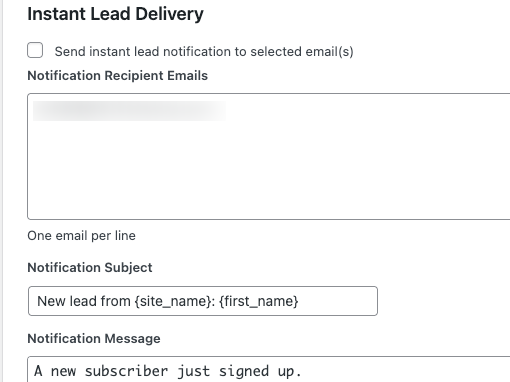
LeadPop Lite can send new lead notifications to selected email addresses whenever someone signs up.
This is useful for:
- sales teams
- booking teams
- agency clients
- support teams
- business owners
You can also attach the new lead as a CSV file.
EXPORT SUBSCRIBERS LIST ANYTIME
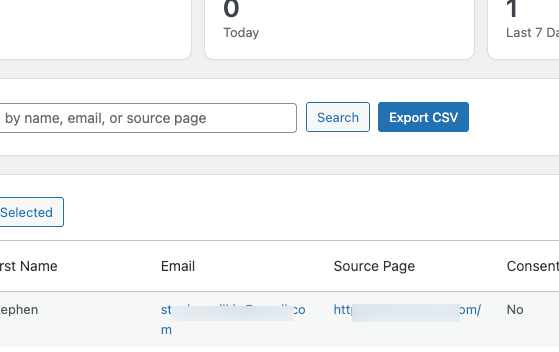
Export your subscriber list anytime.
CSV exports include:
- first name
- phone
- source page
- consent status
- signup date
You can import your CSV into tools like Mailchimp, Brevo, HubSpot, Google Sheets, or your CRM.
SCHEDULE SUBSCRIBER REPORT
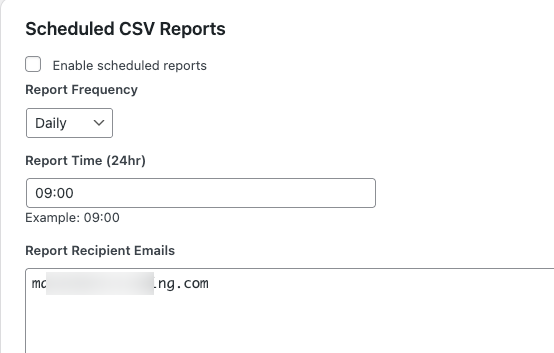
Automatically send subscriber reports by email.
Choose:
- Daily reports
- Weekly reports
- Monthly reports
Report ranges include:
- Today
- Last 7 days
- Last 30 days
- All subscribers
Admin Controls
LeadPop Lite includes a tabbed admin settings interface, so you are not stuck scrolling through one long settings page.
Settings are grouped into:
- General
- Popup Design
- Form Fields
- Triggers
- Display Rules
- Emails
- Lead Delivery
- Reports
- Testing
This makes the plugin easier to configure, test, and manage.
Version 1.7 – More features will be added in future versions e.g multi emails automation, campaigns, etc.
Included Features
- Popup lead capture
- First name field
- Email field
- Phone field
- Field enable/disable controls
- Required/optional field controls
- Editable popup copy
- Popup image upload
- Popup width control
- Font size controls
- Color controls
- Close button color control
- Delay trigger
- Exit intent trigger
- Scroll trigger
- Manual trigger mode
- Shortcode popup button
- Display rules
- Page include/exclude controls
- WooCommerce exclusions
- Consent checkbox
- Subscriber storage
- Subscriber search
- Bulk delete
- CSV export
- Visual email editor
- HTML code email editor
- Email preview
- Test subscriber email
- Instant lead notifications
- Scheduled CSV reports
- Duplicate email handling
- Redirect after signup option
- Admin testing tools
Free Lifetime Access
Start Capturing Leads Today
Install LeadPop Lite, customize your popup, and start collecting subscribers from your WordPress website.

LeadPop Lite – WordPress Email Popup Plugin with Email Automation
₦51,800.00 Original price was: ₦51,800.00.₦0.00Current price is: ₦0.00.
WordPress plugin ZIP file. Upload, activate, and configure from your dashboard.
How to Install
After purchase, download the ZIP file and follow the simple installation steps.
LeadPop Lite installs like a normal WordPress plugin.
Go to:
Plugins → Add New → Upload PluginUpload the ZIP file, activate it, then manage everything from:
LeadPop Lite → SettingsYour subscribers are stored in your WordPress database and can be exported anytime.
Email Delivery Recommendation
LeadPop Lite can send subscriber emails, lead notifications, and scheduled reports using WordPress mail.
For better delivery, we recommend connecting your site to SMTP using a plugin like:
- FluentSMTP
- WP Mail SMTP
- Post SMTP
For best results, use a domain email address and configure SPF, DKIM, and DMARC records.
Frequently Asked Questions
LeadPop Lite is a WordPress popup lead capture plugin that helps you collect contact details, send subscriber emails, export CSV files, and deliver leads to your team.
Yes. It is designed to work with most standard WordPress themes.
Yes. It includes WooCommerce display rules so you can hide the popup on shop, product, cart, checkout, and account pages.
Yes. You can disable the first name field and phone field if you only want to collect email addresses.
Yes. The phone field can be disabled, optional, or required.
Yes. The subscriber email uses a visual and HTML editor, so you can edit normally or work directly with code.
Yes. You can export subscribers as a CSV file from the WordPress dashboard.
Yes. It supports desktop exit intent, delay trigger, scroll trigger, and manual shortcode trigger.
LeadPop Lite is designed to stay lightweight and focused.
Not fully. LeadPop Lite captures and stores leads inside WordPress. You can export leads as CSV and import them into your email marketing platform.
Yes. Early buyers get lifetime access to the current version and updates. Use a correct email when purchasing so we would always reach out to you with updates.
Designed by Chris A.
LeadPop Lite is designed by Chris and released through Chris Resources.
It is built for WordPress users, website owners, agencies, creators, and small businesses that need simple tools that actually work.
Chris Resources creates useful digital tools, plugins, and resources for people building online.
Refund Note
Due to the digital nature of this product, all sales are final once the file has been downloaded.
If you have installation issues, contact support and we will help you get set up.
Disclaimer
LeadPop Lite is provided as a WordPress lead capture tool to help website owners collect subscriber information, manage leads, send emails, and export subscriber data.
Email delivery depends on your WordPress hosting, SMTP setup, sender domain configuration, and email authentication records such as SPF, DKIM, and DMARC. LeadPop Lite can send email through WordPress, but it cannot guarantee inbox placement or prevent emails from being filtered by spam systems.
Website owners are responsible for how they collect, store, export, and use subscriber data. If you use LeadPop Lite to collect personal information, make sure your website has the right privacy policy, consent language, and data handling practices for your location and audience.
LeadPop Lite does not replace legal, privacy, compliance, CRM, or email marketing advice. Always test the plugin on your website before using it on a live campaign.
Please test on your website before running a live campaign. Email delivery works best with SMTP and proper domain authentication.